01
Every project on one screen
The portfolio board shows every live project with its stage, approved budget, forecast spend and what is currently holding it up.
How it works
Projects are grouped by workspace and programme. Budget and schedule health are computed from the live data underneath, not typed in, so the board cannot drift from the projects it summarises.
Why it matters
This is the screen a director opens before a review. It replaces the Monday morning ring-round and the slide that was accurate last Thursday.
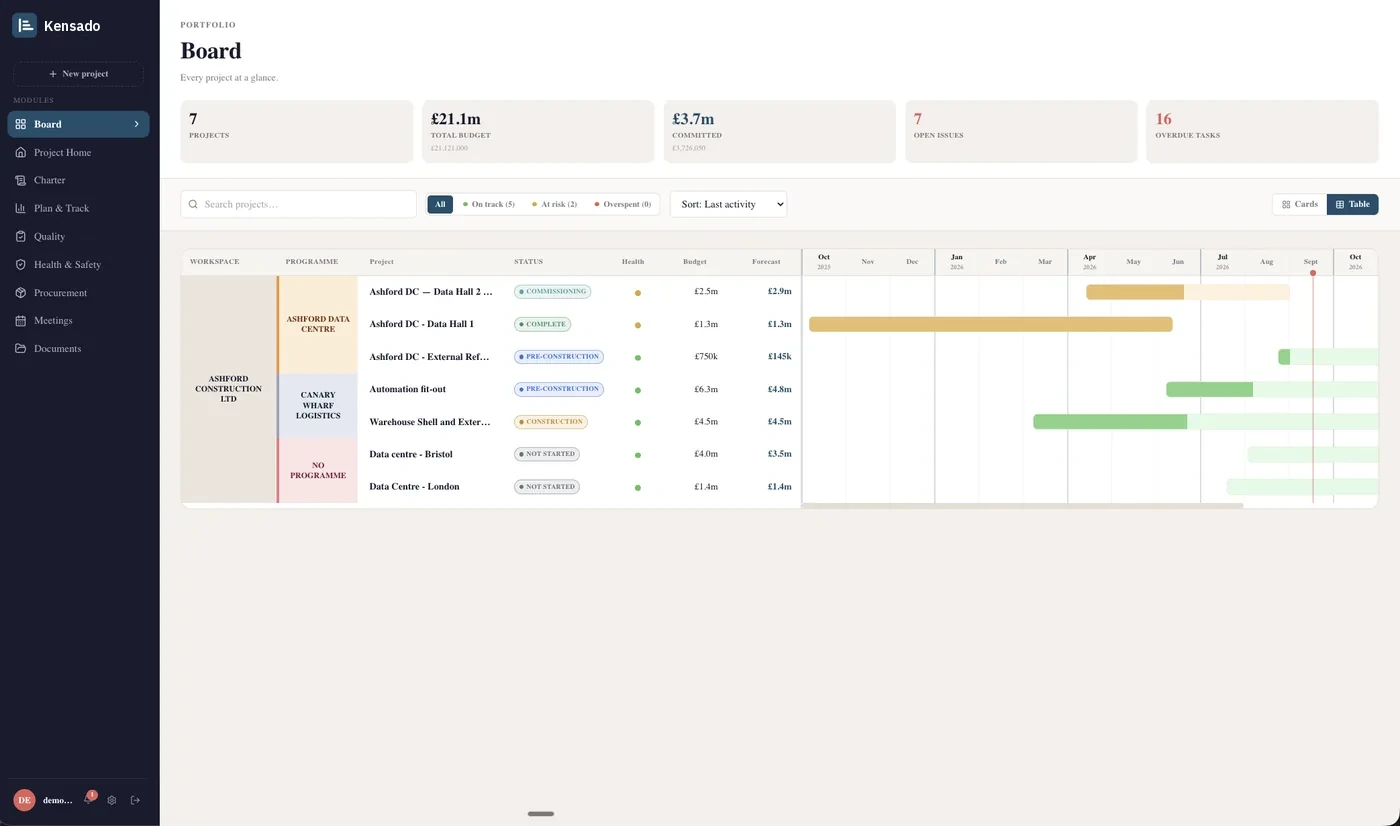
Portfolio board with budget, forecast and status per project
02
A programme that knows what it costs
The Gantt and the budget are the same object. Every task can carry its own budget line.
How it works
Sequence the work with finish-to-start, start-to-start and finish-to-finish links, lags and milestones. The critical path shows what is driving the finish date, and the baseline shows what has slipped. Raise a PO against a task and the committed position updates instantly. Invoices match to the PO, so actuals land against the task that generated them. Cash flow projects forward from the same data.
Why it matters
When something slips, you can see what it costs on the same screen as the slip. No reconciliation between a planner's file and a QS's spreadsheet.
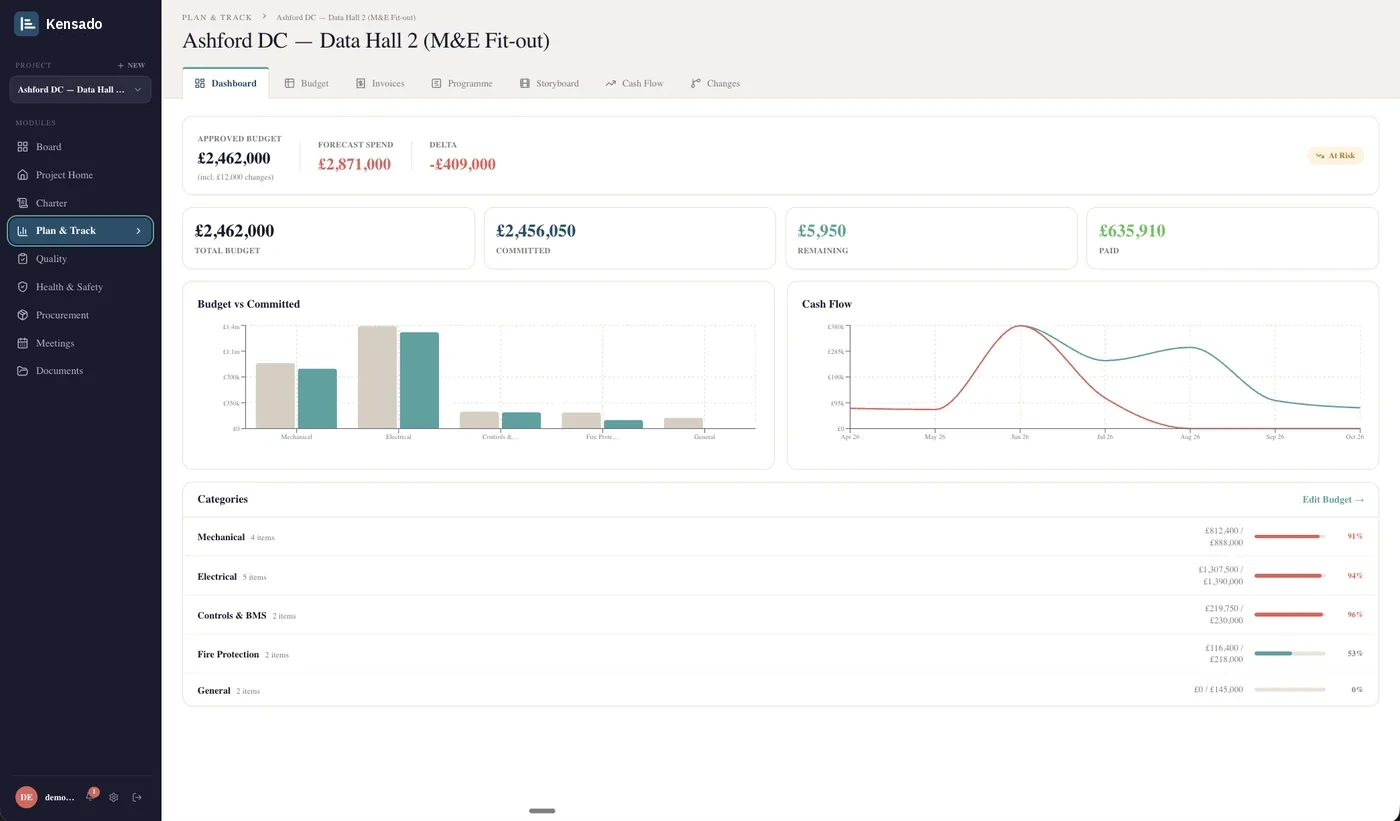
Dashboard showing approved budget, forecast spend, committed cost and cash flow
03
Works with your contractor’s MS Project
Send the programme out as an MS Project file, and bring their revision back as the .mpp they saved. No converting, no retyping.
How it works
Export to MS Project or Excel with every link and indent intact. When the revision comes back, import the file as it is: an MS Project .mpp or .xml, a Primavera P6 .xer, or an Excel sheet. Kensado matches each task and shows exactly what moved, what was renamed, added or dropped, and what it does to your finish date. Nothing changes until you apply it, and the whole import can be undone.
Why it matters
The contractor keeps their tool and you keep one record. An import never touches budget values, costs or POs, so a programme revision cannot quietly rewrite your numbers.
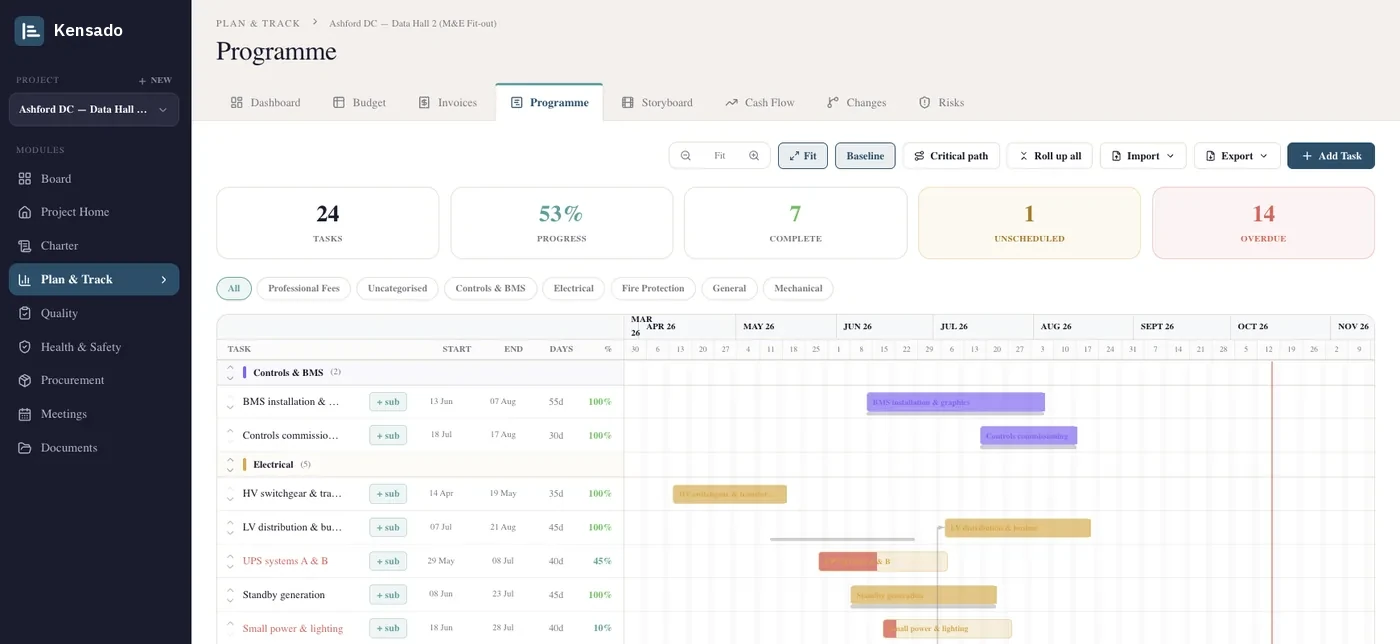
Programme with links, baseline and critical path, with MS Project import and export
04
Stage gates that actually hold
An asset cannot advance while an open issue sits against it. Enforced by the system, not by a rule somebody remembers.
How it works
Define the stages your assets pass through, from installed to handed over. Issues are severity-rated, and a high-severity issue blocks progression until it is closed. A failed critical check raises one automatically.
Why it matters
Completion stops being an opinion. Your defect list becomes the mechanism that controls progress rather than a report nobody reads, and you get a defensible reason to decline a witnessing request.
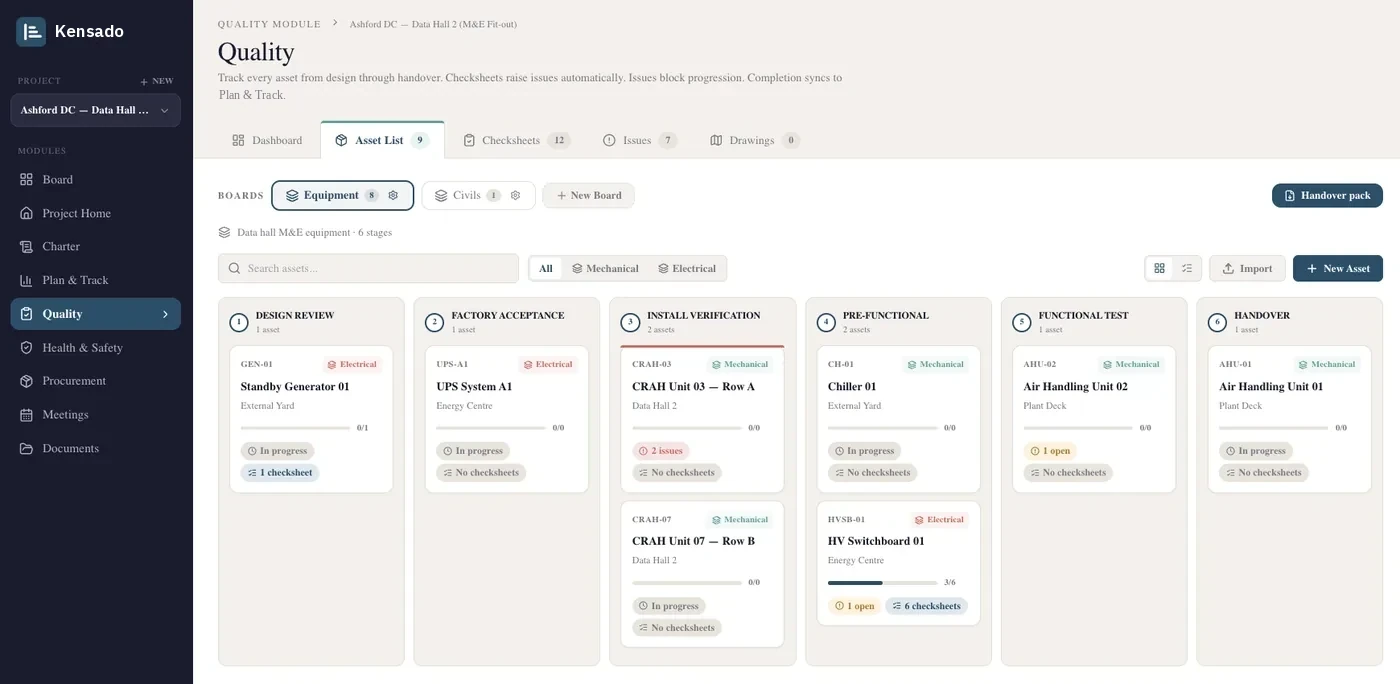
Asset board: every asset at its stage, with the issues holding it back
05
Checksheets filled at the asset, on a phone
The person doing the work records it where the work is, with photo evidence and a signature.
How it works
Open the checksheet on a phone in the plantroom. Numeric answers carry tolerances, critical answers can raise an issue automatically, and a signature question advances the stage. Issues can be pinned to a position on a drawing.
Why it matters
A record signed at the asset is worth more than the same record typed at a desk a fortnight later, legally as well as practically. It is also the only version that actually gets done.
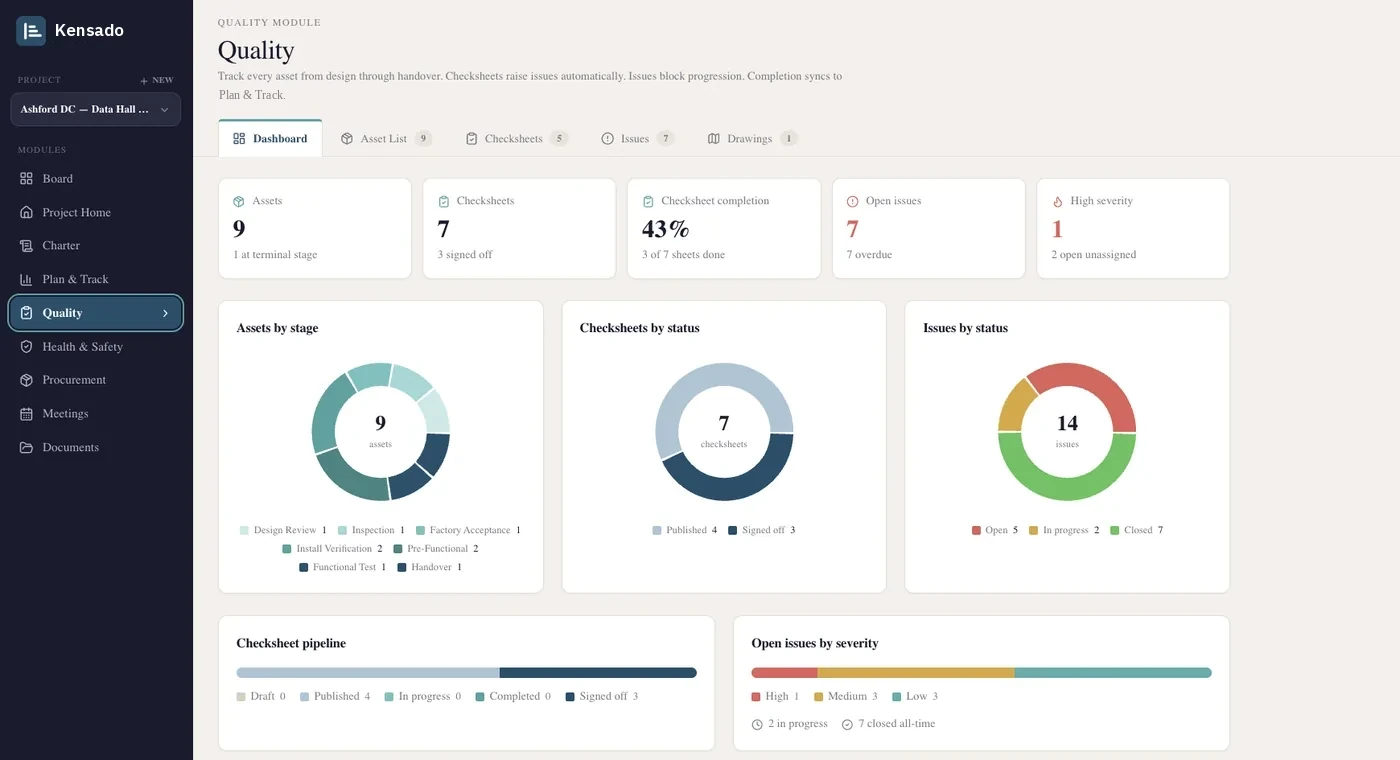
Quality dashboard: checksheet completion and open issues by severity
06
Import the checksheets you already have
Your ITPs and templates are already written, usually in Excel. Upload the workbook rather than retyping it.
How it works
Import a spreadsheet, categorise the questions once, and each becomes a template you can issue against any asset of that type.
Why it matters
This is usually the difference between an asset register that stands up in week one and one that never gets finished. Nobody rebuilds two hundred checks by hand.
07
System tests across a group of assets
Some checks test a whole system rather than one asset: a heating circuit, a sprinkler zone, a conveyor line.
How it works
Group assets into a system and issue one checksheet against it, with a row per asset and questions for the system as a whole. It opens only when every member asset is ready (a project admin can start early, with the reason recorded), and signing it off moves them all on together.
Why it matters
Integrated testing is where projects slip. Kensado shows what the test is waiting for, and the result lands in every member asset’s handover record.
08
Approvals with named people on the record
Charters, change requests, documents and RAMS all route through the same approval engine.
How it works
Choose serial or parallel approval, and set whether all approvers or any one of them is enough. Approvers can approve, request changes, or reject with a reason. Every decision records who, when, and against which version.
Why it matters
Approval stops being an email somebody forwarded. When a decision is questioned later, the trail is intact and attributable.
09
Tendering and award, justified
Package the work, invite suppliers, and compare bids side by side.
How it works
Scope a package with its deliverables, send invitations, and receive bids priced line by line. Quotes sit in a comparison matrix scored against your criteria. Supplier RFIs are tracked against the package.
Why it matters
The reasoning behind an award survives the people who made it. That matters most eighteen months later, when nobody remembers why the cheaper bid was not taken.
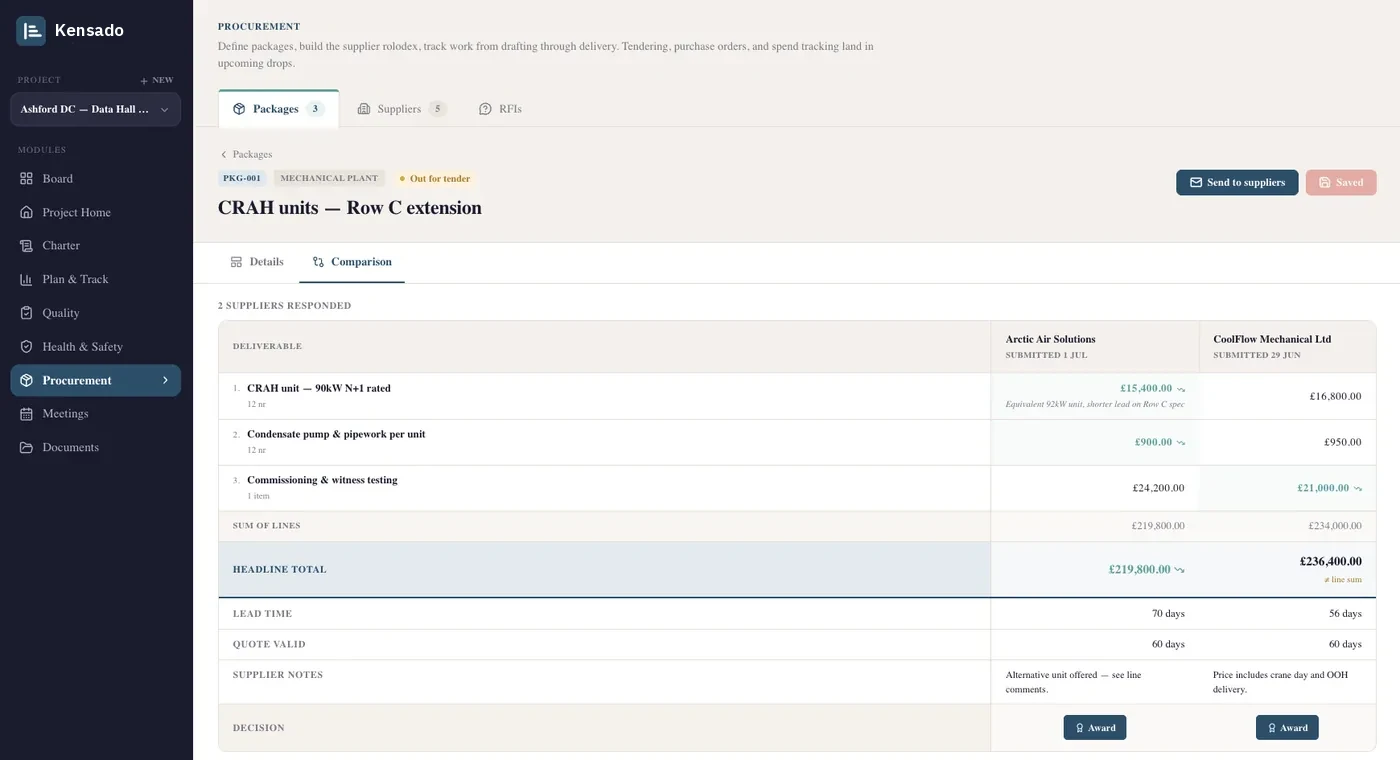
Bid comparison, line by line, with the lowest price on each line marked
10
Document control that answers the awkward question
Which revision was approved, by whom, and when.
How it works
Versioned documents with an audit log. Submit for review, route to named approvers, approve or request changes against a specific revision. Approved documents lock, and reopening one is a recorded act rather than a quiet edit.
Why it matters
In a dispute, this is the question that decides it. Most projects cannot answer it without going through somebody's inbox.
11
The handover pack compiles itself
One click produces the indexed pack: checksheets, photos, signatures, certificates and drawings.
How it works
Because evidence was captured against assets throughout, nothing needs collecting at the end. The pack is generated from records that already exist, and it carries your logo and brand colours, as does every report you send a client.
Why it matters
Handover stops being a three-week document chase. It is the by-product of having done the work properly, which is also what a Building Safety Act duty holder needs to hold.
12
No per-seat pricing
Invite your team, your contractors and your client. One price covers the workspace.
How it works
Billing is per workspace, not per seat. Each plan includes a set number of members, and Programme has no limit. People you invite pay nothing, and they see only the projects you give them access to.
Why it matters
The usual reason a tool stays half-adopted is that adding the next five people costs money. Here it does not, so the record stays complete.